
Upgrade to .env Variables
Introduction
Section titled “Introduction”Starting from January 6 2026, Sunrise has transitioned to using .env files for configuration management.
In this guide, we will walk you through the steps to migrate the environment data from the existing appsettings.*.json files to the new .env format.
Upgrading
Section titled “Upgrading”-
Stop the Server: Ensure that your Sunrise server is not running before making any changes.
If you are running the server using Docker Compose:
Terminal window docker compose -f docker-compose.yml downOr manually stop the server if you are running it directly.
-
Create a
.envFile: In the root directory of your Sunrise server, there should be a file named.env.example. Create a copy of this file and rename it to.env.On Linux or macOS, you can use the following command:
Terminal window cp .env.example .envOn Windows, you can use:
Terminal window copy .env.example .env -
Migrate Configuration Values: Open your existing
appsettings.*.jsonfiles and copy the relevant configuration values to the corresponding variables in the.envfile.Here is an example mapping of the values from
appsettings.jsonto.envvariables: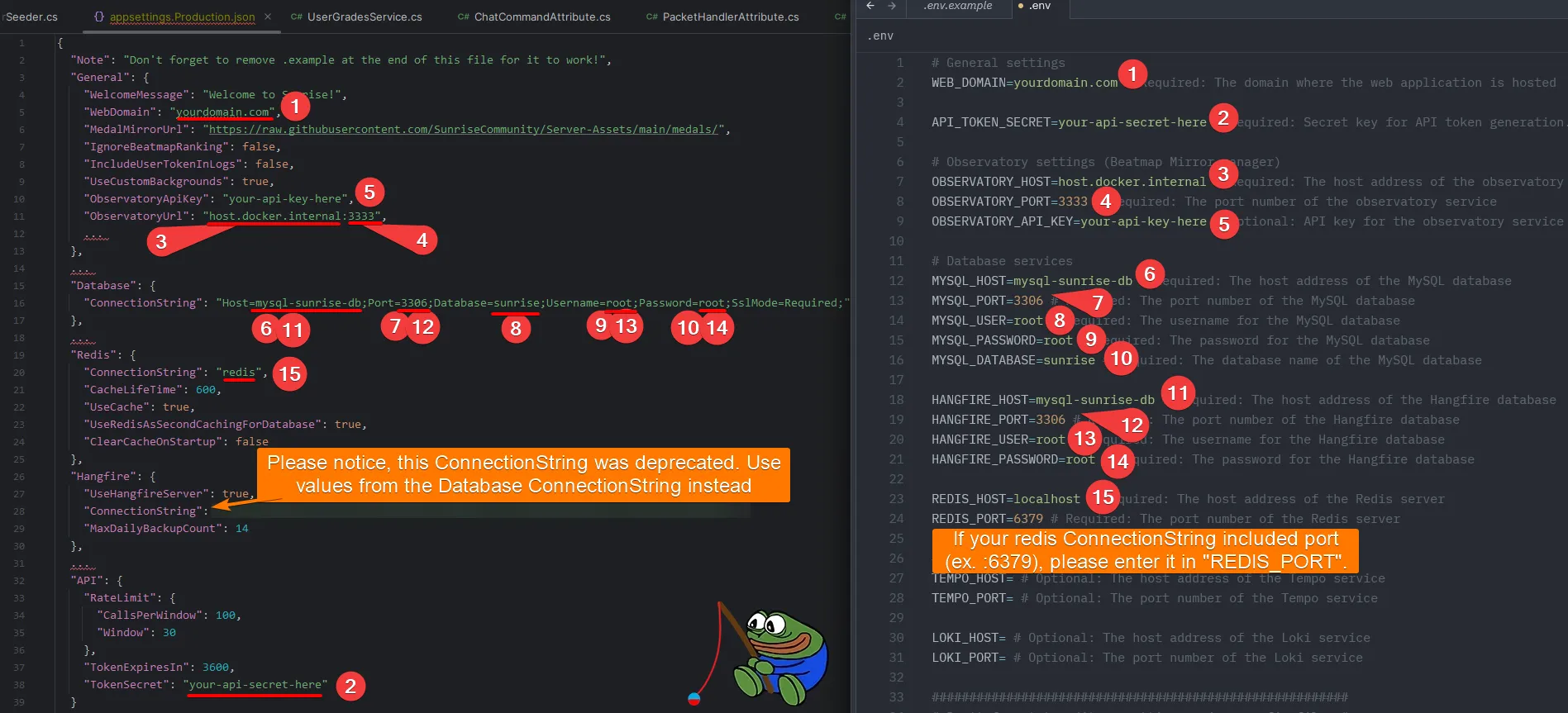
-
Save Changes: After migrating all the necessary values, save the
.envfile. -
Restart the Server: Start your Sunrise server again to apply the changes.
If you are using Docker Compose:
Terminal window docker compose -f docker-compose.yml up -d --build --remove-orphansOr start the server manually if you are running it directly.
Common problems
Section titled “Common problems”env file C:\Sunrise\.env not found: CreateFile C:\Sunrise\.env: The system cannot find the file specified.
Section titled “env file C:\Sunrise\.env not found: CreateFile C:\Sunrise\.env: The system cannot find the file specified.”This error indicates that the .env file is missing from the root directory of your Sunrise server. Please refer to step 2 of the upgrading process to create the .env file.
MySql.Data.MySqlClient.MySqlException (0x80004005): Unable to connect to any of the specified MySQL hosts
Section titled “MySql.Data.MySqlClient.MySqlException (0x80004005): Unable to connect to any of the specified MySQL hosts”This error indicates that the server is unable to connect to one of the MySQL hosts.
If the error code includes Hangfire mention:
Section titled “If the error code includes Hangfire mention:”This indicates that you probably copied the Hangfire.ConnectionString value from appsettings.json to .env file.
As mentioned in step 3 of the upgrading process, Hangfire.ConnectionString is deprecated and doesn’t need to be migrated any more. Use the same connection string as Database.ConnectionString instead.
If the error code doesn’t include Hangfire mention:
Section titled “If the error code doesn’t include Hangfire mention:”Please double-check the Database.ConnectionString value in your .env file to ensure it is correct and matches your database configuration.
Make sure that the database server is running and accessible from the machine where the Sunrise server is hosted.
Deprecated hangfire connection was using Postgres, which is no longer supported. Please set up Hangfire connection using environment variables.
Section titled “Deprecated hangfire connection was using Postgres, which is no longer supported. Please set up Hangfire connection using environment variables.”This error indicates that you didn’t set HANGFIRE_ prefixed environment variables in your .env file and your previous Hangfire connection was using Postgres.
Please add HANGFIRE_ prefixed environment variables to your .env file following step 3 of the upgrading process.